Are paper jams, print queue freezes, and processing lags hurting your team’s productivity? Learn exactly what to do when copier cannot keep up via Canon copier.
When a fast-scaling corporate office, a busy logistics depot, or an intensive legal practice expands its monthly transaction volumes, its physical infrastructure must evolve to match that growth. Many management teams face a frustrating operations breakdown during peak end-of-month billing windows or closing hours, as print queues stall and devices encounter constant paper feed errors. If your workforce is constantly waiting around for multi-page document sets to assemble, knowing what to do when copier cannot keep up prevents back-office administrative blockages from stalling your core business velocity. Continuing to rely on an under-specced, overloaded printer drains staff morale and risks missing crucial delivery or filing deadlines.
What represents the primary root cause when a workspace copy machine fails to keep pace?
Under-specced office printers possess small processing RAM chips and light fuser assemblies that overheat under continuous multi-user demand. The most reliable strategy when your Office copier cannot keep up? Here’s what to do: transition your document physical infrastructure to an enterprise-tier, mid-production operating lease.
Partnering with the document automation specialists at Canoncopier gives your enterprise a clear roadmap for what to do when copier cannot keep up. We replace your under-specced, straining machinery with high-performance, floor-standing multi-functional powerhouses selected directly from the upper tier of the best photocopier machine in Malaysia. Our flexible upgrade paths convert processing liabilities into high-speed, cloud-connected assets backed by comprehensive maintenance coverage, keeping your operations running smoothly.
Fleet Capacity Engineering: Calculating the Workplace Queue Overload Point
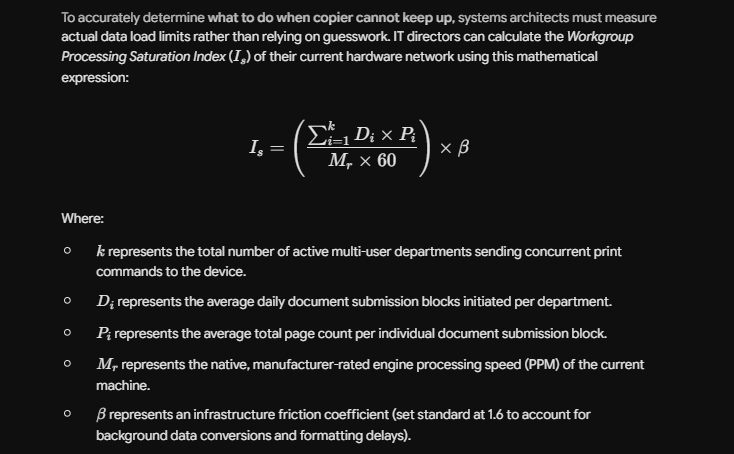
When the Saturation Index systematically breaches an operational value of 1.0, the local print controller buffer overflows, causing processing lag and device freezes. Recognizing this threshold provides the ultimate analytical answer for what to do when copier cannot keep up: upgrade your print network to a high-capacity Canon platform with expanded internal RAM processing cores.
Workplace Scalability Fleet Upgrade Framework
This performance scaling blueprint helps office managers and chief technology officers choose the ideal upgrade path under our flexible leasing framework:
| Current Workplace Bottleneck | Primary Technical Deficit | The Managed Scaling Upgrade Path via Canoncopier |
| Print Queue Lags & System Freezes | Low internal RAM processing buffer; under-specced network controller. | Upgrade to the imageRUNNER ADVANCE DX C3900 series with advanced multi-core processors. |
| Slow Multi-Page Archiving | Slow dual-sided scanning paths; manual page flipping required. | Deploy high-speed Single-Pass DADF scanning systems running at 270+ images per minute. |
| Constant Paper Tray Reloads | Small paper cassettes holding fewer than 500 sheets standard. | Configure high-capacity floor-standing paper decks holding up to 3,500+ sheets. |
| Manual Booklet Assembly Jams | Lightweight plastic frame assemblies; manual stapling required. | Integrate commercial steel-chassis hardware equipped with Automatic Finishers & Staplers. |
FAQ
1. What is the most reliable strategy on what to do when copier cannot keep up with our daily workload?
The most permanent solution when your Copier cannot keep up? Here’s what to do: contact Canoncopier to execute a seamless, mid-term machine upgrade to a higher-speed, high-capacity enterprise model without financial penalties.
2. How rapidly does your engineering team respond if a scaled corporate copier encounters an error code?
We protect your operational continuity through an active support grid. Canoncopier guarantees an enhanced on-site technical response time strictly within 24 hours from the exact moment your service ticket is registered via our automated dispatch desk.
3. Are heavy-duty components like pickup rollers and fuser assemblies covered for free after we upgrade?
Yes, 100% covered. Every moving mechanical part subject to natural wear and tear—including fuser rollers, drum modules, pickup rollers, and internal gears—is replaced completely for free by our field engineers with zero hidden parts billing.
4. Is the original Canon toner cartridge supply completely free under our upgraded managed lease?
Yes, absolutely. Under our proactive smart care monitoring framework for the leased fleet, genuine high-yield Canon toner is supplied continuously based on your metered page outputs, removing individual out-of-pocket ink purchasing loops entirely.
5. Can our hybrid employees execute print tasks wirelessly from Apple MacBooks or corporate smartphones?
Yes, effortlessly. The digital enterprise multi-functional platforms we deploy feature advanced wireless network connectivity supporting Apple AirPrint, Android Mopria, and secure Wi-Fi Direct protocols for smooth, driverless mobile printing.
6. How does a single-pass document feeder (DADF) improve our back-office scanning speed?
A Single-Pass DADF utilizes dual internal scanning sensors to capture both sides of a physical sheet simultaneously, doubling your archival velocity and completely removing mechanical paper-flipping jams.
7. Will Canoncopier charge extra for network installation and driver mapping after a fleet upgrade?
No. Your initial upgrade onboarding covers heavy-duty transport, physical office placement, local IP address network mapping, Scan-to-Email folder pathway creation, and full staff tutorials at zero additional cost.
8. Can these commercial copy machines handle large format A3 spreadsheets without constant jamming?
Yes, they do. All floor-standing multi-functional devices in our corporate fleet are equipped with adjustable paper cassettes that seamlessly feed both standard A4 and large-format A3 paper without jamming.
9. Can our firm track usage to prevent employees from running unnecessary copies on the faster machine?
Yes, we can activate Canon’s standard Department ID Management or uniFLOW profiles, allowing management to assign unique login PINs to track usage and restrict color access across specific departments to keep administrative costs low.
10. How do our monthly rental payments under the upgraded agreement benefit our corporate tax position?
Because your agreement is recognized entirely as an operational expense (OpEx) rather than a depreciating capital asset, 100% of your annual leasing costs can be deducted directly against your gross revenue during LHDN filings.
Find us
“When you opt for our specialized packages, you are getting access to multi-functional equipment that has won industry awards directly from Canon Malaysia for enterprise-level durability and crisp monochrome image processing.”
Our dedicated technical dispatch team provides rapid, 24-hours on-site maintenance to ensure your office print workflow runs smoothly. We proudly serve corporate offices, small businesses, and events across all major commercial hubs within Kuala Lumpur, Selangor, and Putrajaya.
Choosing the right office hardware configuration can significantly impact your monthly overhead. Before committing to a machine, it is highly recommended to read our comprehensive comparison guide on New copier vs refurbished copier rental to discover which option best suits your actual monthly print volume. Additionally, keeping your operational budget safe is easy once you understand the simple maintenance habits outlined in our guide on How copier rental helps SMEs manage cash flow.